






Cat6 Wiring Diagram: Complete Guide to T568A and T568B Standards (2026)
If you are planning to install a high-performance network, understanding a Cat6 wiring diagram is essential. Cat6 (Category 6) cables support Gigabit and 10-Gigabit Ethernet, making them the backbone of modern residential and commercial networks. This comprehensive guide covers everything you need to know, from T568A and T568B pinouts to step-by-step termination techniques.
Table of Contents
1. What Is a Cat6 Cable?
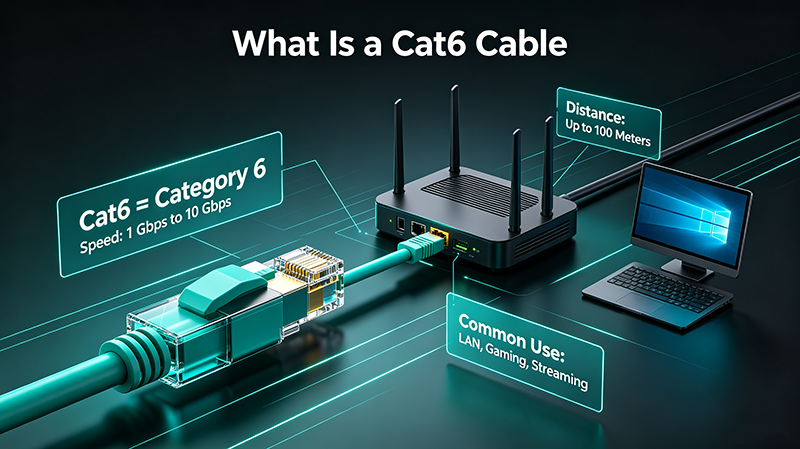
Cat6 is a standardized twisted-pair cable for Ethernet and other network physical layers, defined by ANSI/TIA-568. It is backward-compatible with Cat5e and Cat5 standards but offers significantly improved performance.
Frequency
Up to 250 MHz, double the bandwidth of Cat5e
Speed
Supports 1 Gbps at 100m and 10 Gbps at 55m
Twist Rate
More twists per inch to reduce crosstalk
Splitter
Internal spline keeps pairs separated
2. Cat6 Wiring Standards: T568A vs T568B
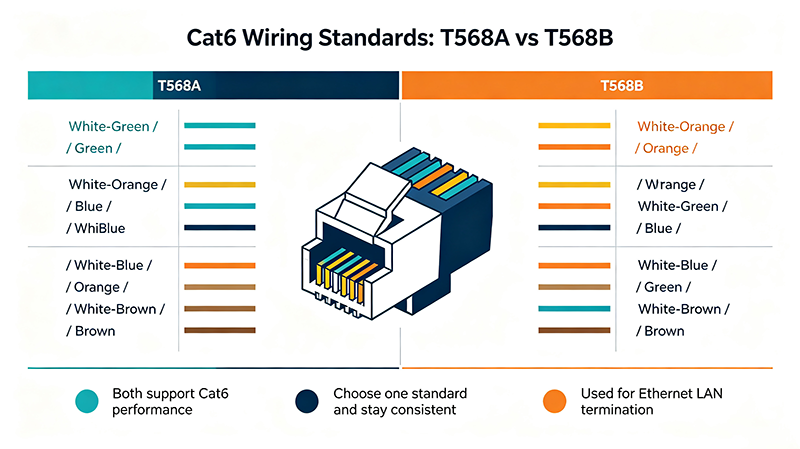
Two wiring standards govern RJ45 termination on Cat6 cables. Both perform identically; the choice depends on regional convention and existing infrastructure.
| Pin | T568A Color | T568B Color |
|---|---|---|
| 1 | White/Green | White/Orange |
| 2 | Green | Orange |
| 3 | White/Orange | White/Green |
| 4 | Blue | Blue |
| 5 | White/Blue | White/Blue |
| 6 | Orange | Green |
| 7 | White/Brown | White/Brown |
| 8 | Brown | Brown |
Important: Always use the same standard on both ends of the cable. Mixing T568A and T568B creates a crossover cable, which is rarely needed in modern networks with auto-MDI/MDIX switches.
3. Cat6 Pinout Diagram
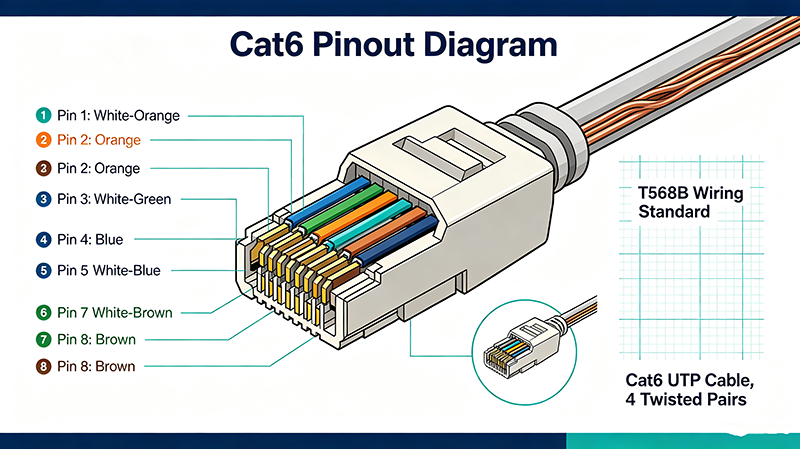
Below is the visual layout of both wiring standards. Hold the RJ45 connector with the clip facing down and the copper contacts facing up to view the pinout correctly.
4. Tools and Materials You Need
- Cat6 bulk cable (solid core for in-wall, stranded for patch cables)
- RJ45 connectors rated for Cat6
- Pass-through or standard RJ45 crimp tool
- Cable stripper or sharp knife
- Cable cutter
- Cable tester
- Punch-down tool (for keystone jacks)
5. Step-by-Step Wiring Instructions
Strip the Outer Jacket
Remove approximately 1 to 1.5 inches (25-38 mm) of the outer jacket using a cable stripper. Be careful not to nick the inner conductors.
Untwist and Arrange the Pairs
Untwist each pair and arrange the eight wires according to the T568A or T568B color sequence. Keep the twists as close to the connector as possible.
Flatten and Cut the Wires
Flatten the wires in order, leaving about 0.5 inches (12 mm) of exposed conductor. Cut the ends straight across.
Insert Wires Into the Connector
Push the wires firmly into the connector. Each conductor should slide into its channel and reach the end of the connector.
Crimp the Connector
Insert the connector into the crimp tool and squeeze firmly. The gold pins should pierce each conductor.
Test the Cable
Use a cable tester to verify all eight wires are correctly connected and there are no shorts or crossed pairs.
6. Cat6 Color Code Chart
Cat6 cables contain four twisted pairs, each easily identified by color. Always follow the standard sequence when terminating.
7. Common Wiring Mistakes to Avoid
Untwisting Too Much
Excessive untwisting increases crosstalk and reduces performance. Maintain twists within 0.5 inches of the connector.
Using Cat5 Connectors
Cat5 connectors do not match Cat6 conductor thickness. Always use connectors specifically rated for Cat6.
Skipping the Spline
The internal spline must be pushed back but not removed. It maintains pair geometry and reduces crosstalk.
Exceeding Bend Radius
Bend Cat6 cables no tighter than four times their diameter to prevent internal damage and signal loss.
8. Cat5e vs Cat6: Key Differences
| Feature | Cat5e | Cat6 |
|---|---|---|
| Frequency | 100 MHz | 250 MHz |
| Max Speed | 1 Gbps | 10 Gbps (up to 55m) |
| Crosstalk | Moderate | Significantly reduced |
| Splitter | None | Internal spline |
| Cost | Lower | Moderate |
| Best For | Home networks | Office, data centers |
9. Professional Best Practices
- Maintain a maximum run length of 100 meters (328 feet), including patch cords.
- Keep Cat6 cables away from power lines to avoid electromagnetic interference.
- Use cable management in racks to reduce strain and maintain airflow.
- Label both ends of every cable for easier troubleshooting.
- Test every cable after termination with a certified cable tester.
- Use proper bend radius and avoid sharp kinks.
10. Frequently Asked Questions
What is the difference between T568A and T568B?
T568A is commonly used in residential and government networks, while T568B is widely used in commercial installations. Both deliver identical performance.
Can I use Cat6 connectors on Cat5e cable?
It is not recommended. The conductor gauges differ, which can lead to unreliable terminations.
Is Cat6 backward compatible with Cat5?
Yes. Cat6 is fully backward compatible with Cat5e and Cat5 devices and ports.
How far can Cat6 carry 10 Gigabit Ethernet?
Up to 55 meters (180 feet). For full 100-meter 10G runs, use Cat6a.
Do I need shielded Cat6 cable?
Shielded (STP) Cat6 is recommended in environments with high electromagnetic interference, such as industrial sites.
Get Our Free Cat6 Wiring Cheat Sheet
Download a printable PDF with T568A and T568B diagrams, color codes, and a termination checklist.
Download Free PDFAbout the Author — MeiXun Team
Chief Engineer Wang
High-tech Enterprise, Feifeng Talent
Chief Engineer Wang graduated with a master's degree in high-power microwave from the Institute of Electronics, University of Chinese Academy of Sciences.
View Full Profile- RF Switch Circuit Diagram
- RF Switch
- Ohm's Law
- dBm to Watt
- mW to dBm
- Wavelength to Frequency
- RF Connector
- SMA Connector
- RF Switch Module
- RF Coupler
- RF PIN Switch
- Microwave Coaxial Switch
- PIN Switch
- Coaxial RF Switch
- Waveguide Switch
- Microwave Switch
- Low Noise Amplifier
- PIN Diode Switch
- Coaxial Switch
- RF Microwave Switch
- SPST Switch